Date and time insertion
Macro %ExTime(...)% allows you to insert the current date and\or time in any format. %ExTime(...)% provides more flexibility than such macros as %Date%, %Time% or %DateTime% (outdated now). In parenthesis, %ExTime(...)% contains a format string that controls the way the date is represented when being pasted into a document.
To add the macro to your string, you can use a special menu that is opened with the "Insert Macros" button in the Main Window.
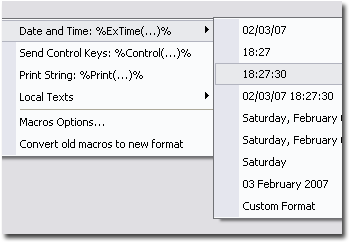
You can select one of several predefined formats for inserting date or use a spacial dialog box for entering your own format string. If you select the "Custom Format..." option, you will see a new dialog box where you should enter the necessary format string.
Date shift
You can shift date by an arbitrary number of days forward or backward. To do this, add the date shift command before the format string. The date shift string contains the beginning marker "+", the command itself - "Nd" and the ending marker - ";", where N is the number of days. To shift date backwards, use "-N", for example:
- %ExTime(+1d;#c)% - paste tomorrow date.
- %ExTime(+7d;#c)% - paste current date plus a week.
- %ExTime(+-1d;#c)% - paste yesterday date.
Sample format strings with their results:
- #c = 05/19/06 10:26:14
- #x = 05/19/06
- #A, #B #d, #Y = Friday, May 19, 2006
- Today is #A, day #d of #B #Y. = Today is Friday, day 19 of May 2006.
Parameters:
- #a - Abbreviated weekday name
- #A - Full weekday name
- #b - Abbreviated month name
- #B - Full month name
- #c - Date and time representation appropriate for locale
- #d - Day of month as decimal number (01 - 31)
- #H - Hour in 24-hour format (00 - 23)
- #I - Hour in 12-hour format (01 - 12)
- #j - Day of year as decimal number (001 - 366)
- #m - Month as decimal number (01 - 12)
- #M - Minute as decimal number (00 - 59)
- #p - Current locale's A.M./P.M. indicator for 12-hour clock
- #S - Second as decimal number (00 - 59)
- #U - Week of year as decimal number, with Sunday as first day of week (00 - 53)
- #w - Weekday as decimal number (0 - 6; Sunday is 0)
- #W - Week of year as decimal number, with Monday as first day of week (00 - 53)
- #x - Date representation for current locale
- #X - Time representation for current locale
- #y - Year without century, as decimal number (00 - 99)
- #Y - Year with century, as decimal number
- #z, #Z - Time-zone name or abbreviation; no characters if time zone is unknown
- ## - Percent sign (%)
- \# or !*!- # sign