%Open(...)% - Open documents, web-pages or run other programs
You can use the %Open(...)% macro to open documents, folders, launch favorite programs or quickly open required web-pages.
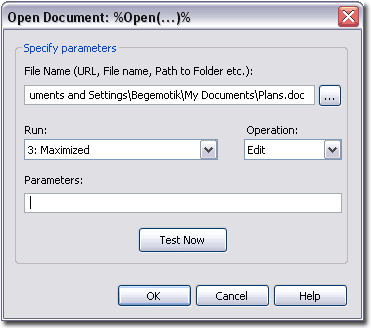
Usage
The macro body is a string of parameters enclosed in parentheses. Separate the parameters with the "|" character. You can specify up to 5 parameters:
Parameter string format: %Open(Target|Operation|Parameters|Run|StartIn)%- Target - Specifies what to run - path to a file, folder, web-page or application to launch.
- Operation - Specifies the action to perform. Standard actions are Open, Explore, Edit, Print, Find.
- Parameters - You can specify command line parameters if the application requires them.
- Run - Specifies the way to run the application: in the normal (1), minimized (2) or maximized (3) window.
- StartIn - specifies the current working directory of the program. This parameter cannot be specified in the macro creation dialog, but you can always specify it manually.
All parameters except the first are optional.
Note: if your string ends with the "\" character, insert a space after it, before the closing ")%". Otherwise, the macro will be pasted as text, because "\)%" is used to include a literal ")%" in the macro body.
Examples
- %Open(c:\Work\ )% - Open the c:\Work folder in Explorer.
- %Open(c:\|||3)% - Open the root folder of drive C: in a maximized window.
- %Open(C:\Documents and Settings\UserName\My Documents\Plans.doc|Edit||3)% - Open the Plans.doc document for editing.
- %Open(https://flashpaste.com/)% - Open the Flashpaste homepage in a browser.
Advanced Example
%Control(@100_alt_PRINTSCREEN)%%Open(mspaint.exe|Open||3)%%Control(@1000_ctrl_v)% - Takes a screenshot of the active window, opens Paint and pastes the screenshot.
Intro
Using the program
Macros