Flashpaste String Selection Dialog Box
The String Selection Dialog Box is a special dialog box for selecting the string to be pasted or copied. When you need to paste a string you entered before, just press the hot key or click the icon in the system tray with the left mouse button and the String Selection dialog box will appear on the screen.
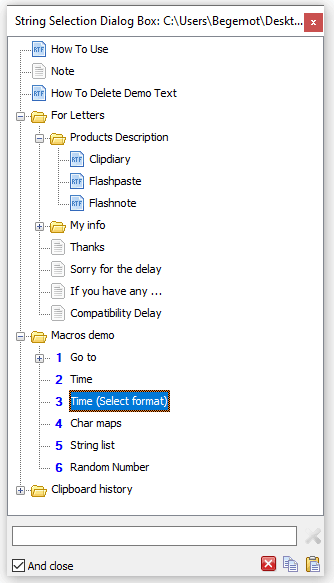
 A hot key label for quickly selecting or pasting the string.
 Paste the text into the current position of the cursor.
 Copy the string to the clipboard.
 Close the String Selection dialog box.
 Close the String Selection dialog box after the text is inserted or copied into the clipboard.
Now all you have to do is use the keyboard (arrow keys), mouse or Hot Keys to select the string you need. After that you can:
- Paste it directly into the application that was active at the moment you opened the String Selection dialog box (Enter or a double click with the left mouse button);
- Copy the string to the clipboard (Ctrl + C, Ctrl + Insert, ...)
- Cancel pasting the string by pressing the Esc key.
You can use a tooltip appearing next to the String Selection dialog box to see the full text of the current string. If you want to see this tooltip, select the corresponding checkbox in the options of the program.
Intro
Using the program
Macros